Stage 1: USCIS / I-130
Stage 1: USCIS / I-130. You are starting the process. The I-130 establishes a qualifying relationship between petitioner and beneficiary; it does not assess finances or issue a visa. Approval (NOA2) moves the case to the National Visa Center. Do not plan around the old 12-month figure. Consular I-130 adjudication stalled in February 2026 and the front of the line has not moved meaningfully past priority dates of around 25 February 2025 since. Petitions filed after that date are largely unapproved, so a case filed today has no reliable estimate at all. If you are already past the line, read Stage 1A: Delayed I-130. Do this first: work through the I-130 Pre-Submission Checklist, then file online.
Action list
- Petitioner: Create a free USCIS online account at myaccount.uscis.gov.
- Either: Work through the I-130 Pre-Submission Checklist before you start the form. Filing with a complete, consistent package is the single best thing you can do for your timeline.
- Beneficiary: For spousal petitions, complete Form I-130A (Supplemental Information for Spouse Beneficiary). It does not need to be signed if you complete it outside the United States.
- Petitioner: File online using exact legal names and dates consistently, and upload clear scans with descriptive file names, organized by category.
- Petitioner: Save your NOA1 receipt notice, and add your priority date to the community tracker.
- Petitioner: Filing for more than one relative? Link the petitions yourself: USCIS will not link them automatically.
Reached a milestone in this section? Add your I-130 priority date and approval date to the community tracker →
The I-130 establishes a qualifying relationship between petitioner and beneficiary. It does not assess finances or issue a visa. Output is an approval (NOA2), which moves the case to the National Visa Center. [USCIS I-130]
I-130 adjudication for consular cases has effectively stopped. Volumes fell from mid-February 2026 and the front of the line has not advanced meaningfully since: per Track My Visa, the oldest unadjudicated petitions carry priority dates of around 25 February 2025, and what little movement remains is confined to cases filed before that date. Those petitions are now roughly 19 months pending, and every week the stall continues adds to that figure and to the eventual end-to-end wait.
This is a historically unusual stall, not a normal backlog. Approvals that do land past the 25 February 2025 line have been rare, and community reporting is that they overwhelmingly belong to cases that escalated: a demand letter or a writ of mandamus, rather than the queue moving in turn. If your priority date is on or after that line, read Stage 1A: Delayed I-130 and the remedies and escalation guide. Note that a writ compels a decision, not an approval, and escalation is not a guarantee.
USCIS has not formally acknowledged any pause, and it has shown no sign of easing through the summer of 2026. This affects everyone in the consular-filing route regardless of nationality (it is separate from the 75-country visa pause, which was struck down by a federal court on 21 August 2026; AOS and DCF filings are not part of this queue).
The I-130 is adjudicated by USCIS, not by an embassy, so it is the one stage of this process that runs the same wherever you are filing from. This site does not track it. Track My Visa does, across all consulates, and publishes regular updates on where the queue stands: go there for current I-130 numbers, and compare against official USCIS processing reports, which lag the community data.
Under current US policy (April 2025), USCIS determines sex from the original birth certificate and only recognizes male or female markers. If your documents carry inconsistent sex markers, this can cause delays at USCIS, NVC, and the embassy medical. See Stage 4: Medical exam for full guidance and support resources.
If USCIS made a clerical error or you notice a mistake on your I-130 after filing, you can request a correction using USCIS's e-Request for Typographical Error Correction. This can be done at any stage: before or after approval. Submit evidence of the error and what the correct information should be.
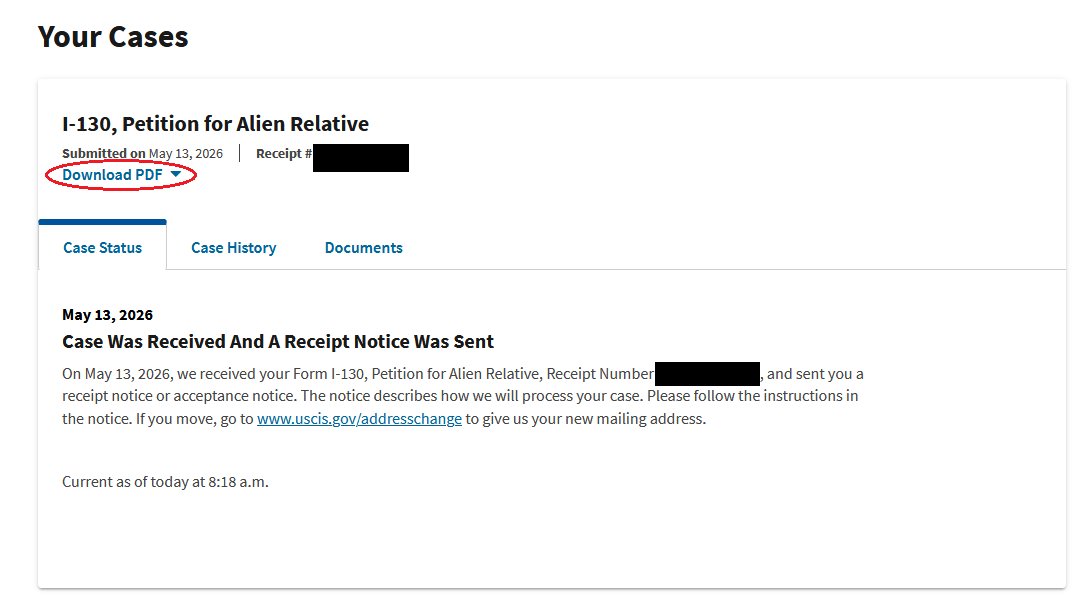
The "Download PDF" link on your myUSCIS portal will download a copy of the I-130. It looks just like the paper copy that you would fill out by hand, but it maps all the information you submitted on your electronic filing. But it doesn't map everything correctly, and that's unfortunately normal.
Filing the I-130 online is the recommended route for consular cases. You get instant receipt of your NOA1, document uploads instead of posting originals, and a portal to track the case. The steps below sequence the process; each links to where the detail lives, so you are never guessing what comes next.
This guide deliberately stays at the step level: the form's questions and the filing UI change over time. For depth, use the official USCIS I-130 page and instructions, and Kseniya International's online I-130 filing walkthrough for a screen-by-screen guide to the spouse petition.
If you are filing I-130 petitions for multiple family members, for example, a spouse and a child, or a parent and a sibling. USCIS will not automatically link them. You need to make the connection explicit so the cases move through NVC together. Follow these steps:
USCIS must review everything you upload. Keep your documentation high quality over high quantity: clear labels, organized files, and explicit connections between cases matter more than volume.
Your myUSCIS account loads case data from an internal web service. You can open that data directly in your browser and see fields the normal case page does not show, including a status code and the timestamps behind the last update. You are only reading your own case, while logged in to your own account.
This is not an official USCIS tool and it is not documented for public use. The codes are not always interpretable, the data can be incomplete or out of date, and USCIS can change or remove the endpoint without notice. Use it for curiosity only. Do not make decisions, draw conclusions about your timeline, or file anything based on what you see here. For case status that you can rely on, use your myUSCIS case page and the USCIS Case Status tool.
https://my.uscis.gov/account/case-service/api/cases/IOE##########, replacing IOE########## with your own receipt number, for example IOE1234567890. Only your own cases will load; anything else returns an error.eventCode: the exact status code for the case. Codes are drawn from the NIEM benefit document status code list, though not every code there is used and USCIS does not publish its own mapping.eventTimestamp: the date and time of the last case event.dateUpdated: when USCIS last updated the case record in their system.
A new timestamp means something touched your record. It does not necessarily mean an officer reviewed your petition: routine system updates, address changes, and internal transfers all move these fields. Meaningful signals are still the ones on the case page itself, such as a move to "Actively Being Reviewed", a new document in your account, or an RFE. Processing time fluctuations on myUSCIS are normal and are not a signal.
Before you move on
- Petitioner: My NOA1 receipt notice is saved, with its receipt number and priority date.
- Petitioner: I have downloaded the PDF copy of my submitted I-130 for my records.
- Petitioner: If I filed for more than one relative, each petition shows the other’s receipt notice and the family connection.
- Either: We check the portal periodically, keep our address current, and respond to any RFE.
- Either: For F visas: we monitor the Visa Bulletin monthly for our priority date.